German trains have very much to complain about, but honestly, their customer facing IT is pretty good. I've not had to deal with PDF tickets nor printed tickets in years.
The website and app work well, in my experience. It's all pretty sleek and modern, too. It's the one area they do a good job in, to be honest.
Absolutely, it's probably the most consumer-friendly and reliable part of all of the Bahn services. Personnel is usually pretty great too, and that despite them having to suffer the most from all the inept decisions made in the upper ranks.
What? The app is infamous for just "forgetting" tickets and when you get caught you HAVE to pay a fine and no they will not accept screenshots. You will win in court but have fun paying for everything in advance.
> What? The app is infamous for just "forgetting" tickets
Citation needed. I've never heard of this being an issue (certainly not an "infamous" one) and almost everyone I know constantly travels by train and uses the app regularly. Maybe you're mixing things up with Deutschlandticket apps by regional transport associations, but that's not DB's fault.
Tickets get hidden from the default view once they're expired, but that's to be expected and you can press the prominent "Previous trips" button to see them.
This is super cool, and I wish something like this existed at my place, as it enables information sharing without the need for phones/actual screens that shine in your face when the lights are low or tempt you to doomscroll.
That said, the large primary display this uses is $2000. That's very hard to justify for any "normal" household, and that's without any mounts, backend, services etc.
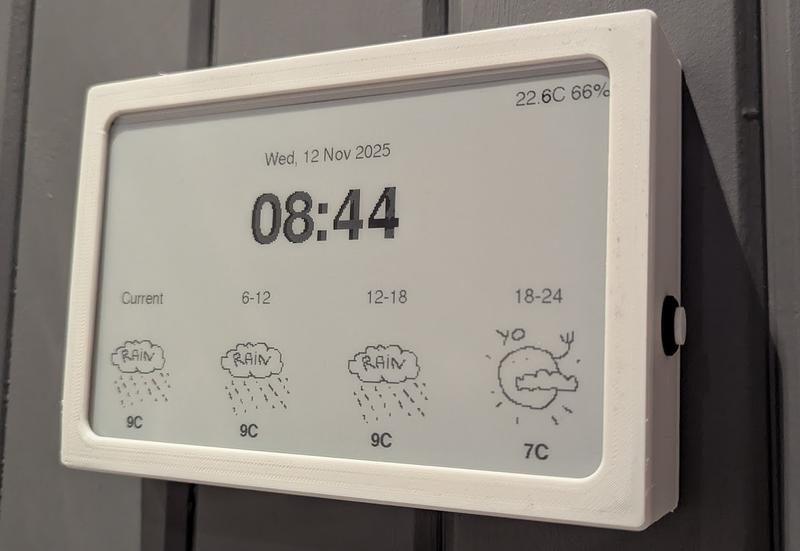
I made this thing [1] for us, it uses a cheap 10" e-paper display off aliexpress, an ESP32 and a couple of I2C sensors. The case is 3D-printed. It runs on two 18650 batteries, and all in all it cost less than 100$. The OpenWeather API is free for personal use.
Thanks! I intentionaly made the weather symbols somewhat "childlike" to give it some personality and also make it obvious that it's a custom device, and not some off the shelf gadget. Works well as a conversation starter!
The sun is greeting you! I drew these freehand, kind of quickly. And while I personally like the style and think it's a good fit for us, I did intend to make several sets of weather icons. At the very least I need to make the sun symbols adapt to the seasons - we don't really have a full sun during the darkest months of the year where I live.
I incorporated OpenMeteo into a project recently and got frustrated with their aggressive rate limiting. If in the US, weather dot gov has an excellent, free API. Or, OpenWeatherAPI which works internationally and has support for more things that weather dot gov does not. OpenWeatherAPI will also synthetically provide weather data based on their models if there is missing station data
> I incorporated OpenMeteo into a project recently and got frustrated with their aggressive rate limiting
Which one? They seem to do 600 calls / min, 5.000 calls / hour, 10.000 calls / day, 300.000 calls / month, how many times do you need to look up the weather for personal use? Fine, maybe you want 3 different locations, you can still call each of those sufficiently with those rate limits, no?
Right, but less "I want to know what the weather is locally and maybe in my summer house" and more "I'm curious about sampling global weather/temperatures", right? I don't think the intention of the API is for the latter, but more for the former.
a redis geospatial index + redis distribution locks you can build a performant cache layer that is consumed by a ton of people and stay well under that rate limit.... the weather data only updates every 5 minutes too, so you can use that for your cache ttl.
Yes, I think so. Electronics prototyping is so accessible now, and there's such a deluge of inspirational projects out there to learn from. YouTube is a gold mine, and I'll leave links to a few channels I follow, below.
If you get an Arduino or Esp32 microcontroller (maybe in one of those starter-kits with various sensors), some breadboards, assorted jumper-cables and a kit with electronic components (resistors, caps) you'll be good to go. A device like a wall clock most likely won't require soldering, since it won't be jostled or moved around much.
If you already have Home Assistant running, I think it should be simple. Most of the time you can buy devices with pins already soldered and it's just the matter of connecting them together. AIs are pretty good with ESPHome configs. You can even take a picture so that they can help you identify the correct pins. Some coding may be required for drawing things on the display though.
+1, and have you tried running 2 displays side by side ? That should give you an effective diagonal of 14 inches or so, and for those displays, cutting it in two does not really affect the utility of the display (likely tabular content anyway).
Seems like the author has experimented with 2 kindles side by side.
I source most of my components from aliexpress. It's been a while, but these are the components I used:
Microcontroller: FireBeetle 2 ESP32
Display: Generic 10" e-Paper display with driver board included
Timekeeping: DS3231 Real Time Clock Module
Temperature and humidity: BME280 module
Charging: Type-C USB 2S Li-ion BMS
That, along with a breadboard, two 18650 batteries, some resistors and capacitors make up the hardware. I modelled and 3D printed the case. I used the PlatformIO plugin (available for VSCode-based IDEs) for programming and transferring code to the esp32.
You might be interested in knowing about https://trmnl.com. No affiliation beyond interest in buying a few in the future. They have a 10.3" version in the works.
You can make smaller ones for much much less. I’ll post pics of mine a bit later but waveshare 7.5” display in a photo frame and almost any ESP32 dev board and you are set for less than $100 (along with suitable HomeAssistant and ESPhome infrastructure to support it).
The original article is a very slick bit of work, so well done
The article also mentions using jailbroken kindles which I assume should be the cheapest way to get a decent sized epaper screen with builtin connectivity.
Gonna piggyback here to second this and chime in to say I went with the BYOD screen linked within your link for $49 (SKU 104991005). It's definitely more barebones and probably not even as cost-effective if you're still planning on buying the "lifetime" TRMNL API access.
I don't have easy access to a 3d printer, so I just have mine sitting on an extra phone stand I had lying around that can be had for a few bucks from Amazon.
I couldn't be happier with it and am thoroughly enjoying my complacent, lazy solution :)
i could have been clearer about that. but yeah, even for what i paid, i was happy to immediately be off to the races designing the couple panels within their web portal and having something functional and useful to me without any real friction from having to figure things out.
moving on to the self-hosting side is probably now backburnered indefinitely, even if i do have some grander ideas in the longer term. unfortunately, i'd need more than a weekend project's timeframe to bring them to fruition.
OP's Timeframe looks rad, but yes on the pricy side. check out trmnl .com for smaller / less expensive options and self hosted options. (disclaimer: i'm on the team)
thanks for the support and i hear you. a few folks pointed their Boox at TRMNL[1], and we’re finally in the smart home arena now with free 5 min refresh rate for Home Assistant. aiming for JIT refresh by summer.
bought trmnl & have been sorely disappointed with the transparency regarding self-hosted options & the availability of functionality. Was led to believe Hanami BYOS was identical to the hosted server. have opened a ticket, have had others voice the same sentiment. I appreciate the effort, but lament the reality of TRMNL & the marketing.
you can import ~700 plugins from core to Terminus (Hanami build) or the Laravel build in 1 click. maybe you came on board before that was a reality. we and the community have been rapidly developing multiple self hosted servers with all kinds of features and in different frameworks for comfort. in no marketing materials have we ever claimed that OSS clients were the same as the main web app. in fact that’s why we offer a BYOD license for the web app only. we’ve invested hundreds of thousands into open source so that people can get the TRMNL experience without paying us a penny.
what do you think it should be called? for ~$15 optional one time bucks people get 24/7 access to the entire engineering team, me, prioritized feature dev, and can earn monthly payouts from our Creator Fund. we don’t charge a subscription, obviously i’m partial but this model has serves us well. and most of the developer edition fee goes right back to the community via bounties, perks, etc.
Developer Access or something like that, and put part of your comment in there. I would remove the word Unlock entirely, it implies you’re locking code, as opposed to providing a service.
My solution was to buy a used Samsung tablet with OLED screen, and control the display on with motion sensors. It sits in the hallway, above the keys drawer. The screen is on only when someone's walking nearby, and around eye level when you go pick up the keys. Designed the dashboard based around muted colours on black background, with brights reserved for "hey pay attention to this" data. And most importantly, the screen is not visible from any spot you're likely to stay at for a longer time. As for mounting, I used calipers, 3d printer and some double sided tape. It's not completely seamless, but damn close for ~10% of the effort.
The tablet itself runs https://www.fully-kiosk.com/ to display a web dashboard. Fully Kiosk has good Home Assistant integration, including screen on / off controls. I also have a bunch of Sonoff battry operated zigbee motion sensors scattered around the place. Then Home Assistant does what it was meant to do - act as a glue layer between various systems, firing screen control commands to Fully Kiosk as a result of select motion sensors triggering.
The dashboard itself is a react app talking to my Home Assitant instance over a websocket. The heavy lifting of bringing various data sources together is done by HA, I just wrote a react app because it seemed easier than learning to customize HA dashboards to the degree I wanted to.
I did a similar thing with a regular backlit computer screen.
It automatically shuts off after 30 seconds of inactivity.
I added a $3 webcam, and use openCV to detect motion. If three consecutive frames (sampled 0.5s apart) are each sufficiently difficult from the previous one, it attaches a virtual USB mouse, then moves it one pixel.
This wakes up the display whenever you walk past, then puts it back to sleep again when you stop moving.
The motion-detection pipeline uses less than 0.3% CPU on an intel N100 (6w TDP).
> The MR60BHA2 is a 60GHz wave sensor that detects breathing and heartbeat patterns. Using its radar technology, it can monitor vital signs without direct contact, even through materials like clothing or bedding. You can use it for sleep monitoring, health assessments, and presence detection.
This is kind of crazy, I had no idea this was a thing. And here I have PIR sensors all over the place and hacks around those, that definitively sounds much better. Besides being more expensive and weaker range, any drawbacks for using it for motion sensing?
There are a couple of options for a large, non-backlit, low power display that are less expensive than the e-ink monitor they're using. One is the Samsung EM32DX, a 32" color e-ink digital sign for <$1300 (<$1000 if you can find it on sale) but it has a long refresh time. The other is the SVD rE 32" reflective LCD monitor for ~$1000, but it needs to be in brightly lit rooms because of its low contrast.
In my post, I talk about how QHD was not high enough resolution for usable text rendering at 32". The SVD monitor is even lower resolution, just 1080p. I'd love to see a true 4k SVD product but I'm guessing it'd be even more expensive than the Mira Pro.
There are lots of other eInk devices you can use LVGL with.
ReTerminal and other derivatives from Seeed Studio are two options. Seeed even has a newish color unitfor under $250 [0].
Not trying to diminish all of the thought and work that's gone into OPs project but a lot of this has been available to do in HomeAssistant for quite some time. Glad more people are finally seeing the value in eInk like this. I've been using them for a while in my office and bedroom for simple status as the OP states: only showing certain status depending on state.
The other unit I tinkered with quite a bit of is the Heltec Vision Master E290 [1] which is a 3" eInk devices for under $35. Based on ESP32 and has LoRa.
Approach the expense like a business. Save up for expense, but more than that, look at lost revenue due to time lost to doom scrolling. If you're able to be more productive or having it results in more productivity, can you said to not get it?
That said, $2,000 is for one at that size. You could get a e-reader and root it for way less. It would be smaller but would be correspondingly cheaper.
I have a similar setup at home with a homemade dashboard. It's less polished and I've never implemented smart home (don't use any smart home devices) but it's calendar, weather, air quality and subway alerts. I also took the tack of building the UI with Bootstrap 3 so that it will run on any of my ancient devices like a gen 2 ipad air. I did it as much to usefully recycle old screens as anything else.
e-ink is low-power and easy on the eyes. But for a cheaper project recipe:
    * repurposed old LCD rotated to portrait mode
    * Raspberry Pi 400
    * Debian with Sway showing various tiled terminals/browser windows
    * self-hosted REST server that collects/provides data to display
If you go the image-rendering route for e-paper, Sharp (the Node.js libvips binding) is surprisingly good for this. You can do grayscale conversion, resize to the exact panel resolution, and apply Floyd-Steinberg dithering all in one pipeline with minimal memory overhead.
The trick with e-ink displays is that naive grayscale conversion looks terrible because you lose all mid-tone detail. Dithering the image down to 2-4 levels before sending it to the display makes a huge difference in readability, especially for things like weather icons and charts. ImageMagick can do it too but Sharp is about 4-5x faster for batch processing since it avoids spawning subprocesses.
I appreciate the author being vulnerable like this in a public setting. It's easy to see why it would be scary, especially since admitting being wrong or not knowing something can easily be turned into questioning one's overall competence.
I wish we'd be more open about our flaws and knowledge gaps in general. I think we'd all benefit.
I had an old colleague (at various points he was my boss, colleague, and subordinate at different places) that really opened my eyes up to the power of saying you don’t know how to do something.
I used to also fear appearing incompetent if I admitted to not knowing too many things, so I would avoid showing my knowledge gaps whenever possible.
However, this colleague was the exact opposite. He would gleefully tell people he had no idea how to do certain things, would be a ready listener when the person he was talking to explained how it worked, and would heap praise on the person for their knowledge and teaching skills. He would always defer to other people as experts when he didn’t know, and would make sure our bosses and coworkers knew who had helped him and how much they knew about the topic.
What I saw and experienced was that this did NOT, in any way shape or form, make people think less of him. It did the exact opposite. First, it made people REALLY happy to help him with stuff; he made you feel so smart and capable when you explained things and helped him, everyone jumped at the opportunity to show him things. He learned so much because he made everyone excited to teach him, and made his coworkers feel smart and appreciated for their knowledge.
And then, when he did speak with confidence on a subject, everyone knew he wasn’t bullshitting, because we knew he never faked it. Since he gave everyone else the chances to be the expert and deferred all the time, you didn’t get the one-upmanship you often get when tech people are trying to prove their bonafides. People were happy to listen to him because he first listened to them.
I have really tried to emulate him in my career. I go out of my way to praise and thank people who help me, always try to immediately admit where my skills and experience lack, and don’t try to prove myself in subjects I don’t really know that well. It has worked well for me in my career, as well.
The suggestion to have the server return the table directly starts bringing presentational concerns into the backend, which I am not a big fan of.
Having the server return plain JSON means the APIs can be reused across products effortlessly and also means that all style changes can be done in the same codebase.
I get reminded of how important this is every time I get to work on an old project that has APIs return HTML that is then being inserted into the DOM by something like jQuery. Figuring it out and updating it is typically a huge mess.
If you control the full stack like in the article, you could have a server backend server the JSON, and another backend taking that and serving HTML, if you wanted.
Edit: This could still be way simpler than the "hydration" approach which is so popular.
> Having the server return plain JSON means the APIs can be reused across products effortlessly and also means that all style changes can be done in the same codebase.
How many products actually share the same server backend?
Do they all organise the same data on the same pages? If no, then you already need per-product APIs to avoid making O(N) fetches from the client side
Having your backend be aware of what is being presented is rarely a bad thing
I personally find the revised designs the author proposes worse than the originals. Sure, the extra space allows larger text and icons, but the overall design quality starts lacking in my opinion.
Maybe I am conditioned to like cards by their excessive use in existing designs, but it might also just be that cards look better, and therefore make the product appear more polished and the site more inviting to use and read. It might not be the most minimal possible design, but a site being pretty is great if functionality doesn't suffer.
Brave however is riddled with Crypto and AI crap. It doesn't have any useable support for multiple profiles, too: last time I tried it, it would end up showing various errors on every startup and you couldn't have two profiles in the same window.
I just start Librewolf with -P and keep profiles in separate windows. Easy, already fully supported, and allows things like different themes to highlight the fact I am using different profiles.
I've been running it for years; I see none of what you mention. I turned off a couple of settings (literally took <5 minutes) and I don't see anything crypto or AI related anymore.
Same. I’ve been using it exclusively on macOS and iOS for a few years now. When you first open it they do show you all those features but as ochronous said you can completely disable them. If they forced crypto and AI on me I’d be out in a flash.


Links: https://samhenri.gold/labs/20250906-lid-angle-sensor/ https://github.com/samhenrigold/LidAngleSensor
reply